How to Track Your Brand in ChatGPT, Claude, Copilot, and Grok
- None of the major assistants gives you a native dashboard, so brand tracking has to be generated with prompts you choose and answers you record.
- Six methods cover it: manual checks, an AI visibility tracking platform like MentionBird, Bing Webmaster Tools for Copilot related citations, your own API workflow, GA4 referral traffic, and server logs.
- Track each platform separately, because the same buying question produces a different shortlist on ChatGPT, Claude, Copilot, and Grok.
- Measure appearance rate across many runs rather than single checks, since a brand's presence flips between consecutive answers about 39% of the time.
- Prioritize gaps by purchase intent, how consistently a rival wins the answer, and whether the page that needs fixing is one you own.
Want to track your brand's visibility across ChatGPT, Claude, Copilot, and Grok? None of them gives you a built in dashboard for it.
You can still get the data, though. Manually run the prompts your buyers actually type across each engine and record what comes back. Use a tool like MentionBird to track mentions and win more recommendations in AI answers. Or build your own setup on each platform's API.
Those are a few of the options, and this guide covers all of them. You will see how to implement each method, how to read the data it gives you, and how to close the gaps it exposes, so you win the customers who now ask an assistant which brand to choose.
Also read: Best AI Visibility Tools
Why Tracking AI Visibility Across All These Platforms Matters
Before the how, the case for bothering at all.
- Your buyers are already there: 73% of B2B buyers now use AI tools in their purchase research, and 46% of AI users start their purchase research on a standalone AI platform, up from 25% in 2024, while traditional search fell from 43% to 24%.
- The traffic converts better: AI search traffic converts at 14.2% against Google organic's 2.8%, a 5.1x advantage.
- One engine is no longer enough: ChatGPT's share of generative AI web traffic has slid from roughly 76% a year ago to around 53%, while Gemini passed a quarter of all traffic and Claude became the fastest growing platform in the category.
- Most brands are not watching: Only 22% of marketers currently track AI visibility, and fewer than 26% plan to build content for AI citations. So roughly four in five of your competitors are guessing at a channel their buyers are already using to shortlist vendors. Start now, and you are fixing your answers while they are still wondering whether this matters.
What Should You Actually Track?
Before we get into the how, let's settle what you should monitor.
| Signal | What it tells you |
|---|---|
| Brand mentions | Whether the answer names your brand. |
| Website citations | Whether the answer references your pages as sources. |
| Referral traffic and conversions | Whether identifiable visitors arrive from AI platforms and take action. |
For example, an answer might name your software while explaining why another option suits the buyer better. That counts as a mention, not a positive citation.
Likewise, citing your educational guide does not necessarily endorse your product. Read the surrounding answer before labeling either result as a win.
Also read: AI Citation Tracking
See how ChatGPT treats your brand right now
Before you set up tracking across every engine, get a free baseline from ChatGPT. See whether it names you, who it recommends instead, and which pages it cites. No signup.
Get your free AI Visibility ReportDifferent Methods to Track Your Brand in ChatGPT, Claude, Copilot, and Grok
We will now explore the different ways in which you can track and analyze your brand's AI presence.
Method 1: Run manual checks and record the results
Manual checks suit a small prompt set or an initial review. Ask each question in a fresh conversation across all platforms.
For every answer, record:
- Date of the check
- The full answer, pasted verbatim
- Brand mentions and recommendations
- Competitors that appear
- Cited URLs
Also note the model, account state, location, and search settings where available, since each one changes the answer.
Keep follow up questions separate from your baseline checks. Otherwise, earlier messages may introduce context that changes the response.
Repeat the checks on different days rather than treating one answer as a lasting result. Save the original responses so colleagues can inspect the evidence, not just your summary.
Also read: Keyword to Prompt Generator, to build your buyer prompt list before you start checking manually.
Method 2: Via AI Visibility Tracking and Improvement Platforms like MentionBird
Once you are past a handful of prompts, the manual method stops paying for itself. MentionBird runs your prompts across up to 20 AI platforms every day, records the full answers, and keeps the history so you can compare periods instead of screenshots.
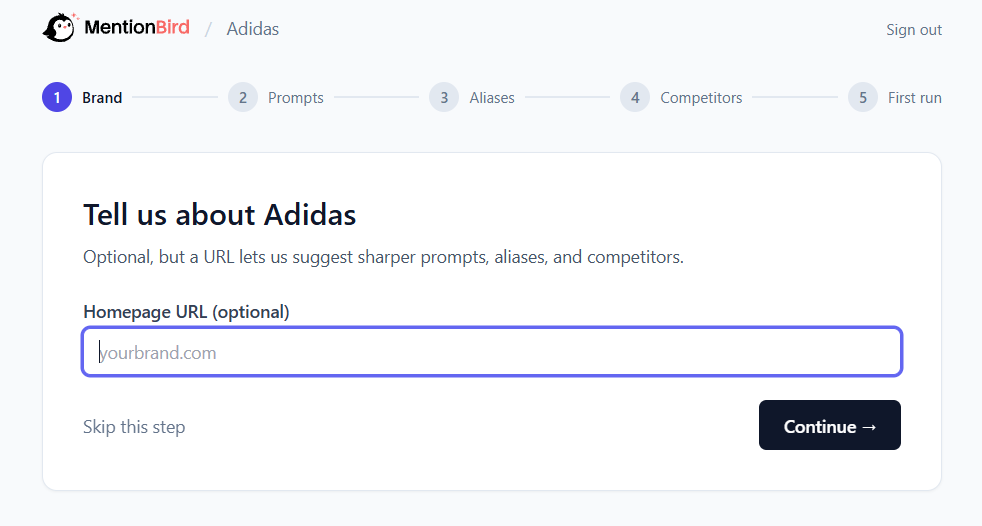
Setup asks for four things:
- Your brand and homepage: The URL registers the domain as yours, which is what lets MentionBird separate citations of your pages from citations of competitors.
- Prompts: The buying questions you want monitored, not branded queries. Accept the suggestions, write your own, or both.
- Aliases: Anything containing your brand name is matched automatically. Aliases are for the names that do not, like standalone sub brands, product names used without the brand, acronyms, and common misspellings. They apply retroactively, so adding one later corrects your past data too.
- Competitors: Name the rivals you know about. MentionBird also surfaces brands that keep appearing next to yours, which usually turns up a few you had not considered.
Each platform is tracked separately, because the same question produces different shortlists on Claude, Copilot, and Grok. For a question you care about, track it everywhere. The differences between platforms are the finding.
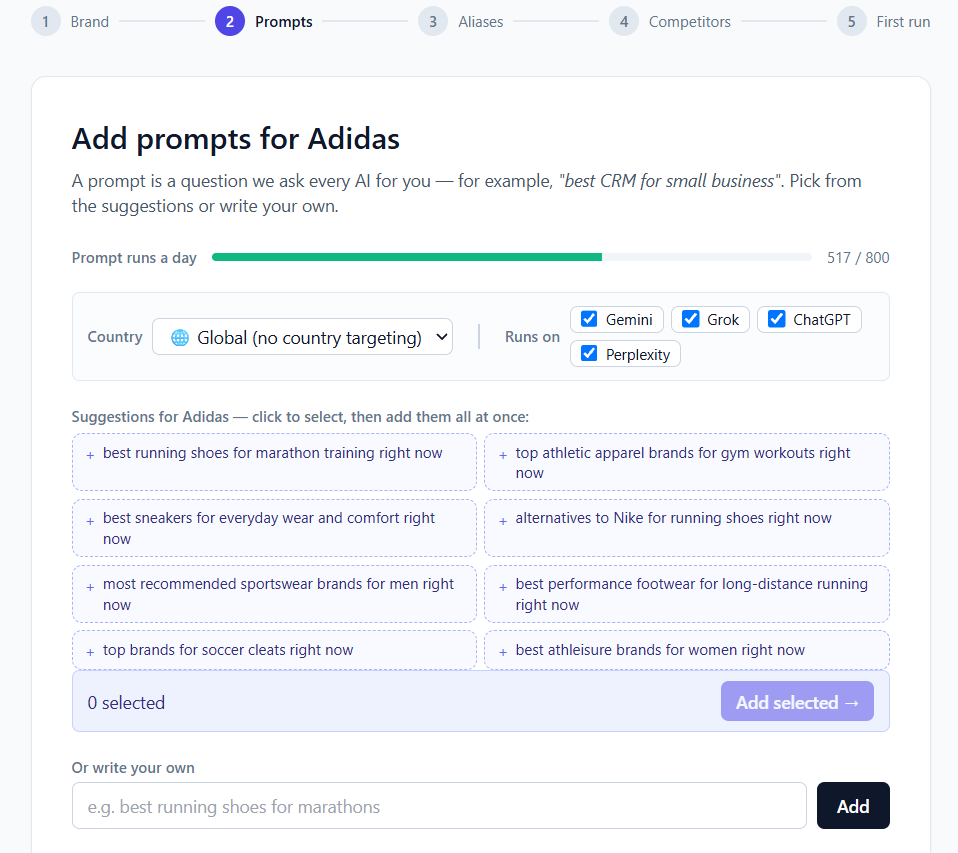
The first few answers come back live and the rest within the hour. On day one, read three things: whether you appear at all, which sources got cited, and who else showed up. Leave the visibility score alone for a week or two. One run per prompt is still a snapshot.
After you have a week of runs, the data stops being a snapshot and starts being a baseline. That is when AI Ranking Advice becomes useful. For every prompt, MentionBird reads the answers and the sources behind them and names the move that would get you into the shortlist, whether that is publishing new content, fixing an existing page, or earning a mention on a source the assistant already trusts.
Also read: AI Ranking Advice, How It Works, Grok brand tracking, AI Hallucination, Claude brand tracking, and ChatGPT brand tracking
Method 3: Use Bing Webmaster Tools for Copilot related citation data
Open AI Performance in Bing Webmaster Tools for your verified website. Review cited pages, retrieval queries, citation counts, and changes over time.
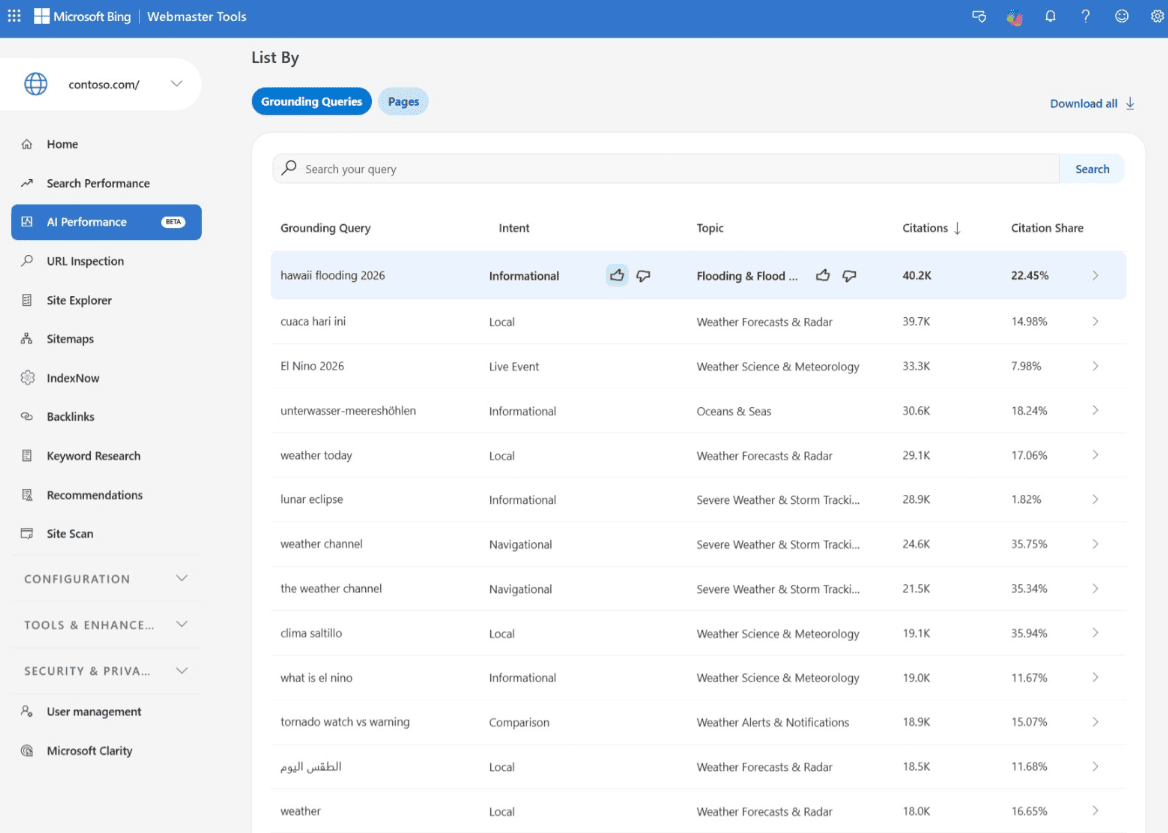
Citation Share shows your site's proportion of citations for a particular retrieval query. Use Compare to examine equivalent reporting periods.
However, the report combines Microsoft Copilot, Bing, and selected partner experiences. It is not a Copilot only dashboard, and Microsoft's documentation does not identify dedicated Claude or Grok reporting.
Also, retrieval queries describe phrases AI used to find supporting content. They are not necessarily the customer's original question.
Method 4: Build a custom API or no code tracking workflow
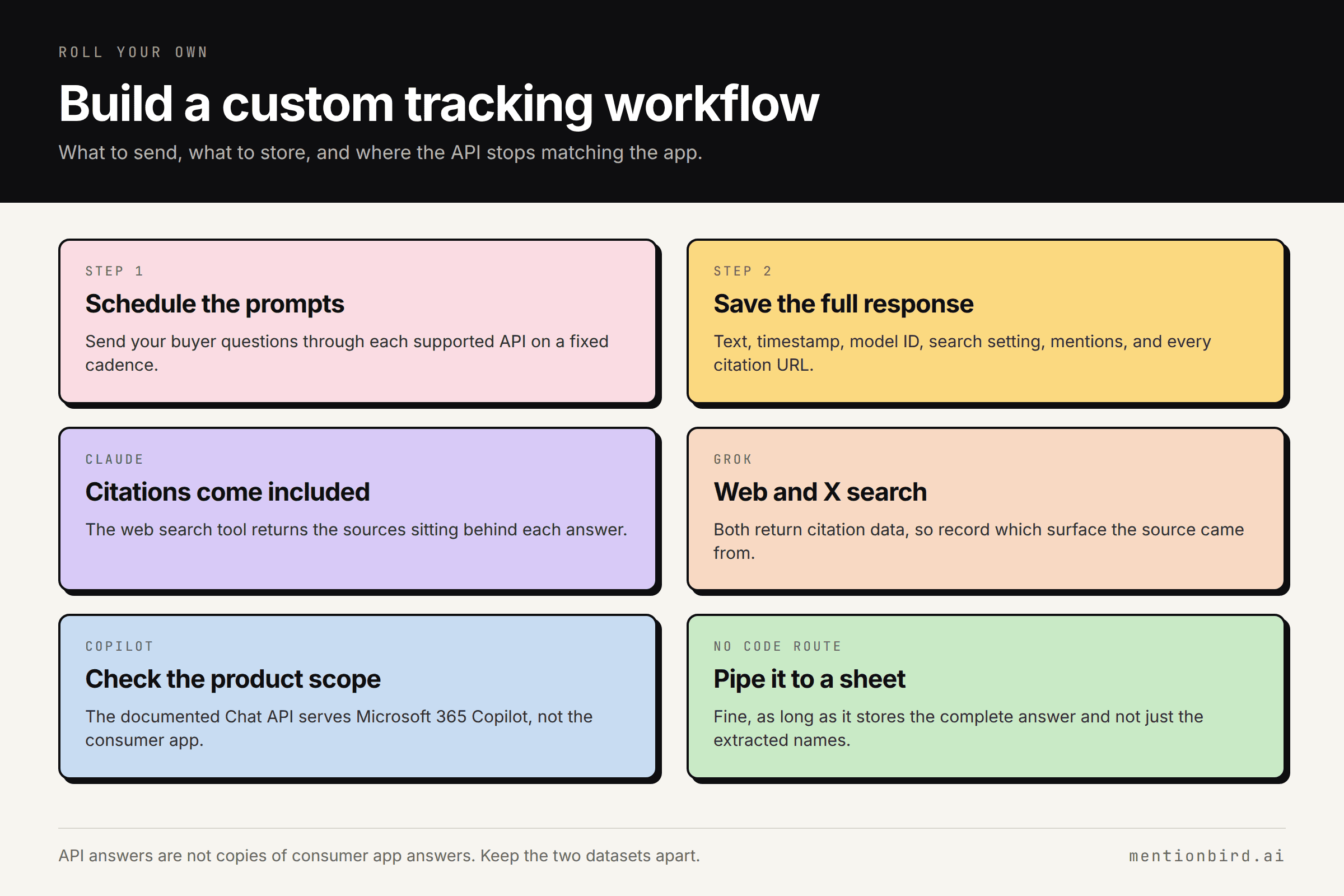
For full control over what gets recorded, schedule a workflow that sends your prompts through each supported API. Save the response, timestamp, model identifier, search setting, extracted mentions, and citation URLs, since anything you skip now cannot be recovered later.
Coverage varies by engine. Claude's web search tool returns the sources behind the answer, and Grok supports web and X search with citation data. Copilot is the exception: Microsoft's documented Chat API serves Microsoft 365 Copilot, not the consumer version, so check the licensing and product scope before treating it as a stand in.
A no code workflow does the same job, as long as it preserves the complete response and not just the extracted names. Either way, keep this data separate from your manual checks. API answers are not guaranteed copies of what the consumer apps return.
Note: If you want this data without maintaining the workflow yourself, MentionBird's MCP server and API let you pull tracked answers, mentions, and citations into Claude, Cursor, or your own reports.
Method 5: Track AI referral traffic in GA4
Everything above measures what the assistants say. GA4 measures what happens after someone clicks through.
How to find it
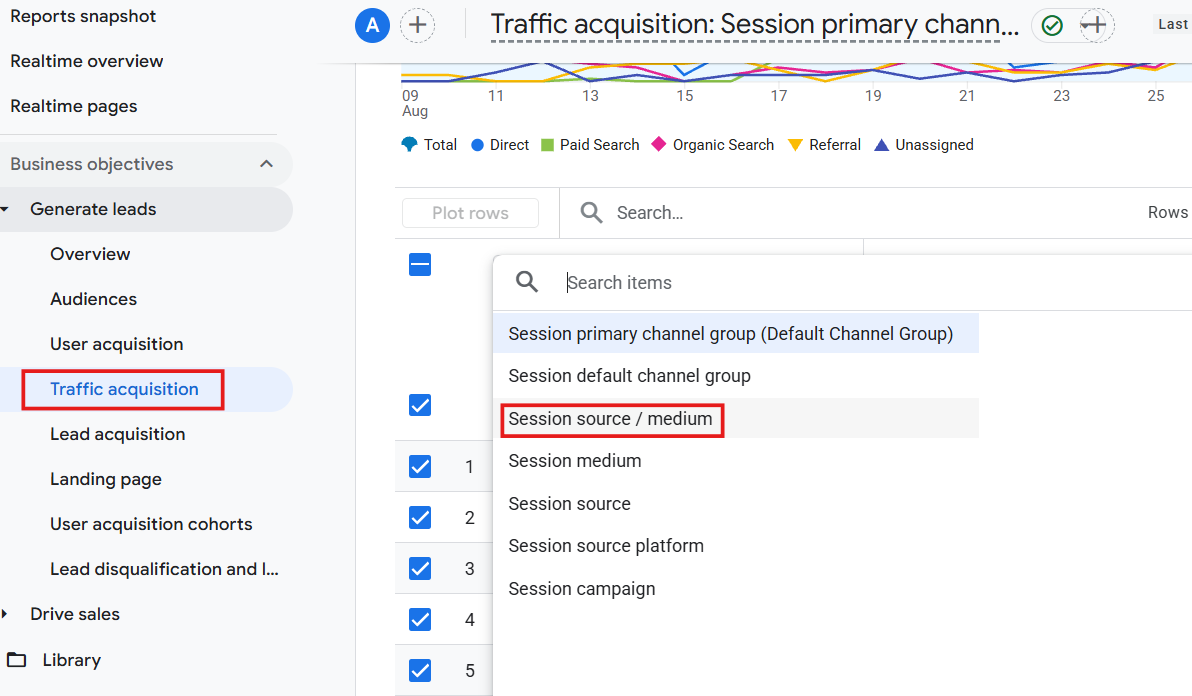
- Open Reports, then Business objectives, then Generate leads, then Traffic acquisition
- Select "Session source / medium" as your dimension
- Filter to the sources that clearly identify AI referrals
- Review landing pages, engagement, key events, and revenue where ecommerce tracking is set up
What to watch for
- Do not label all Bing or X traffic as Copilot or Grok. Include only sources you can reasonably identify.
- Missing referral information pushes some visits into direct, so your report will undercount AI driven sessions.
- GA4 sees website activity, not every answer that mentions your brand.
Read it as a floor on identifiable visitor outcomes, not as a measure of your total AI exposure.
Method 6: Review server logs and crawler activity
Ask your developer for server or CDN logs. Inspect requested URLs, timestamps, response codes, and documented crawler identifiers.
Anthropic separates Claude-SearchBot for search, Claude-User for user directed retrieval, and ClaudeBot for collecting potential training material.
Keep these categories separate. A training crawl does not demonstrate search inclusion, and a successful request does not prove a citation.
Use logs to investigate blocked requests, redirects, or errors affecting important pages. Then compare access findings with answer level evidence.
This method helps diagnose whether bots can retrieve content. It does not show which brands an answer recommends or how users respond.
How to Interpret Your AI Visibility Tracking Results
Here are the five patterns you will hit most often when analyzing your AI search visibility tracking data, along with an explanation of what they mean:
- Competitors appear, you do not: The assistants are not seeing you as an option in that category. Check which sources they cite instead. That list is your target.
- You appear with wrong or outdated details: The model is working from stale sources. Fix the page it is drawing on and update the third party listings repeating the old claim.
- Citations rise, but referral traffic does not: Normal. Most AI answers resolve without a click. Judge citations on presence and accuracy, not sessions.
- Results differ by platform: Expected. Each engine builds its shortlist differently, so treat ChatGPT, Claude, Copilot, and Grok as separate scoreboards rather than averaging them.
- One check contradicts last week: Usually noise. A single check disagrees with the longer run verdict often enough to be misleading, so compare periods rather than reacting to one answer.
Which AI Visibility Gaps Should You Address First?
Your tracking will surface more gaps than you can work on. Rank them against five questions.
Is the prompt close to a purchase?
A question about pricing or vendor choice is worth more than one asking what a category is.
How often does the same rival win it?
A rival named in most runs is being held up by a source you can usually find and get into. If the names keep changing, the answer is still open, which is easier to win.
Which sources feed the answer?
A directory you can get listed on beats a Reddit thread from 2023 which is archived, and nobody can edit.
Do you own the page that needs changing?
Your own pages ship this week. Anything requiring outreach runs on someone else's timeline.
What will it cost you?
A pricing page rewrite and a comparison roundup placement are not the same amount of work.
How Can You Measure Whether Your Changes Helped?
The metric is a rate, and you need enough runs to trust it.
- Calculate appearance rate per prompt: Runs where you were named, divided by total runs, worked out separately for each prompt on each platform. That fraction is what you track before and after.
- Give it enough runs: A prompt checked five times tells you nothing. Twenty or more runs per period before and after gives the rate room to settle.
- Size the movement against the noise: Presence flips between consecutive runs about 39% of the time (on platforms like ChatGPT and Gemini). A few points of improvement are not a result. A rate that goes from 20% to 60% is.
- Watch citations before mentions: Getting cited as a source usually happens first. Being named as a recommendation follows later, so do not panic if only one has moved.
- Confirm the page was picked up: Your logs will show whether the assistants crawled the edit. GA4 will show whether anyone arrived because of it.
Common Mistakes to Avoid When Tracking Your Brand in AI
The tool is rarely the problem. The setup usually is.
| Mistake | What it does to your data | Do this instead |
|---|---|---|
| Tracking prompts your product cannot serve | Drags your rate down for buyers you were never going to win | Only track questions from markets and buyer types you actually sell to |
| Stacking near identical prompts | One buying need gets counted five times and skews the whole set | Cover different priorities, not different phrasings of the same one |
| Counting failed runs as absences | A timeout looks identical to an answer that left you out | Filter errors out before you calculate anything |
| Editing the prompt set mid quarter | Your before and after are measuring two different things | Freeze the set, then start a new one alongside it if you need more |
| Tracking one country when you sell in several | Hides the market where you are actually invisible | Run the prompts you care about in each country separately |
Conclusion
ChatGPT, Claude, Copilot, and Grok will not report your visibility for you, so the tracking has to come from your side. Pick the method that fits your prompt set, run it long enough to see a rate rather than a snapshot, and work on the sources feeding the answers you lose.
If you would rather skip the setup, MentionBird handles it. No code, no manual checks. Add your prompts and start tracking in an afternoon with ease.
FAQs
1. Do I need paid ChatGPT, Claude, Copilot, and Grok accounts to use an AI visibility tracking tool?
No. The platform queries the engines on its own infrastructure. You only need accounts for manual checks.
2. Can tracking tools show the exact questions individual customers asked AI?
No. The assistants do not share user conversations, and no tool can retrieve them. What good tools do give you is the full answer text from every run they make, so you see exactly how the assistant responded. But the prompts behind those runs are ones you chose. Your list is an informed guess at what buyers ask, never a record of it.
3. What if another company shares my brand name?
Your homepage URL keeps citations attributed correctly. For mentions, read the surrounding text before counting one, and avoid aliases generic enough to pull in the other company.
4. Should sponsored AI recommendations count toward organic visibility?
Track them separately. Paid placements say nothing about whether the model would name you unprompted, and mixing the two leaves you unable to explain a drop when the spend stops.
5. Can I bring historical data when switching tools?
Rarely. Each platform stores its own answers, and they are not portable. Export what you can before canceling, and expect a new baseline from the switch date.
MentionBird's Help Center Resources to Check:

See how often ChatGPT, Claude, Copilot, and Grok name your brand.
First month $19 with code TRY19, then $79/mo. Cancel anytime.