Why We Built a Free AI Crawler Accessibility Checker
- Blocking GPTBot does not remove you from ChatGPT. Training, search, and live browsing are three separate permissions with three separate consequences.
- A passing robots.txt check is not proof of access, because a CDN or firewall rule can reject a crawler before robots.txt is ever read.
- Most blocks are accidental, and Cloudflare defaults are the single biggest cause, with new defaults arriving on September 15, 2026.
- Fix search and browsing access first, since those decide the answers people get today. The training decision can wait.
- Robots.txt is per host, so scan every subdomain that publishes content, not just your main domain.
AI crawlers do three different jobs. Search crawlers build the index an AI answer is drawn from. Browsing agents fetch your page live when someone asks a question. Training crawlers feed future models. Blocking training costs you nothing today. Blocking search or browsing removes you from ChatGPT and Perplexity answers right now. Most teams block one while believing they blocked the other.
This guide shows you which crawlers you are blocking, what each block costs, and how to fix it.
What is an AI crawler accessibility check?
An AI crawler accessibility check tells you whether the bots behind ChatGPT, Claude, Perplexity, and Google's AI features can actually fetch your pages. It reads your robots.txt rules for each crawler, then sends a live request using that crawler's user agent to see what your server returns.
Every other AI visibility tactic sits on top of it. Answer first structure, quotable statistics, schema markup, author bylines: all of it assumes a crawler can reach the page. A block does not produce a bad answer about you. It produces an answer without you, assembled from whichever pages the model could reach.
You will not see it in your analytics either, because there is no visit to measure and nothing to attribute. Your server logs are the only place refused AI fetches leave a trace.
Why sites block AI crawlers by accident
Almost nobody decides to block AI crawlers. The blocks arrive by default, by inheritance, or by a well meant edit two years ago.
Cloudflare is the biggest single reason. On July 1, 2025, it began blocking known AI crawlers by default on newly created domains, so site owners who never touched a setting inherited the block. The rules changed again in 2026: Cloudflare replaced the single AI bots switch with three categories, Search, Agent, and Training, and set new defaults taking effect on September 15, 2026. Two details matter for anyone on that platform:
- New domains get Training and Agent blocked by default on pages that display ads, while Search stays allowed.
- Crawlers that do more than one job are judged on all of them, so blocking Training also blocks Googlebot, Applebot, and BingBot unless you opt out in Security settings.
Cloudflare's announcement is worth reading in full: Your site, your rules.
The rest are edits people made themselves, and we kept meeting the same three versions of the same mistake:
- Blocked training, believed it was search. GPTBot and ClaudeBot added to robots.txt in 2024, which left every crawler that decides the answers people get today fully allowed.
- Allowed everything, believing training was off. Teams who wanted the visibility and assumed their content was safely out of model weights. It was not.
- Clean file, hostile server. A spotless robots.txt paired with a firewall rule returning 403 to anything with a bot shaped user agent.
We were checking all of this by hand, one curl command per crawler, and it was slow enough that we skipped it more often than we should have. That is the short version of why the tool exists.
What are the three types of AI crawlers?
All three mistakes come from the same gap, so it is worth closing properly.
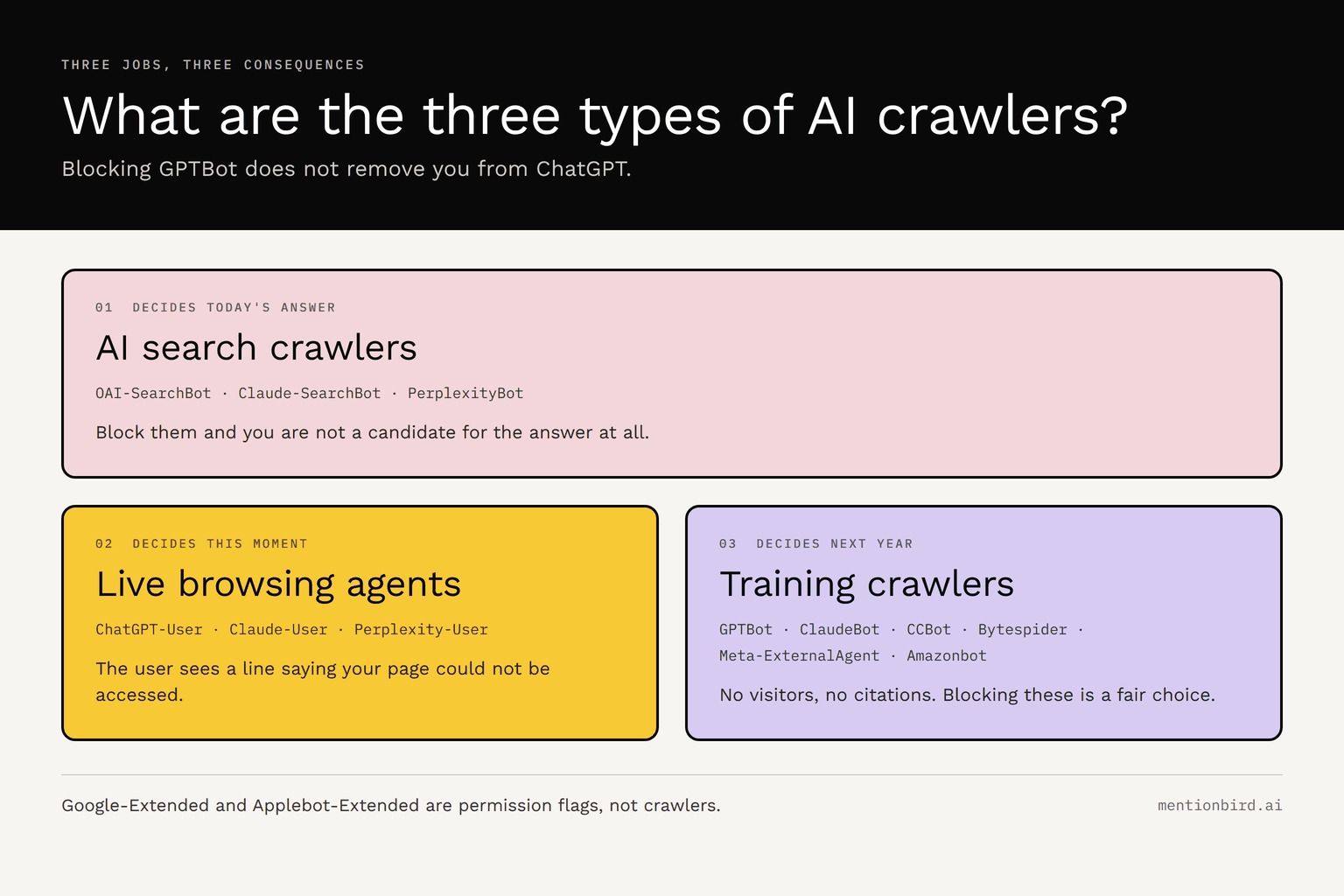
1. AI search crawlers build the index an AI answer is drawn from. Block them and you are not a candidate for the answer at all, though the answer still gets written using whoever is reachable.
2. Live browsing agents fetch a page in the moment because a user asked something the model needs to look up. A block here reaches the user directly, as a line in the chat saying the page could not be accessed. This group matters less than people assume, since nearly one in three ChatGPT answers never touches the web at all.
3. Training crawlers collect content for model training and send no visitors and no citations.
Search and browsing decide the answer someone gets this afternoon. Training decides what a model released next year knows about you. Which brings up the most common misreading in this field: blocking GPTBot does not remove you from ChatGPT. GPTBot collects training data, OAI-SearchBot builds the search index, and ChatGPT-User fetches pages live. Three separate permissions, three separate consequences.
The AI crawler reference table
Fourteen crawlers, what each one does, and what a block actually costs you.
| Crawler | Operator | Job | What a block costs | robots.txt token |
|---|---|---|---|---|
| OAI-SearchBot | OpenAI | Search index | You cannot appear in ChatGPT search results | OAI-SearchBot |
| Claude-SearchBot | Anthropic | Search index | You cannot appear in Claude search results | Claude-SearchBot |
| PerplexityBot | Perplexity | Search index | You are not a candidate for Perplexity citations | PerplexityBot |
| ChatGPT-User | OpenAI | Live browsing | The user sees a message saying your page could not be accessed | ChatGPT-User |
| Claude-User | Anthropic | Live browsing | Same, inside a Claude conversation | Claude-User |
| Perplexity-User | Perplexity | Live browsing | Documented as user triggered and not bound by robots.txt, so a disallow may not stop it | Perplexity-User |
| GPTBot | OpenAI | Training | Nothing today. Future OpenAI models learn less about you | GPTBot |
| ClaudeBot | Anthropic | Training | Nothing today. Future Claude models learn less about you | ClaudeBot |
| Meta-ExternalAgent | Meta | Training | Nothing today. Affects Meta model training | Meta-ExternalAgent |
| Amazonbot | Amazon | Training | Nothing today. Also feeds Alexa answers | Amazonbot |
| Bytespider | ByteDance | Training | Nothing today. Affects ByteDance models | Bytespider |
| CCBot | Common Crawl | Training | Nothing today, but Common Crawl feeds many open datasets | CCBot |
| Google-Extended | Permission flag | Google may not use your content for Gemini training. Does not affect Google Search | Google-Extended | |
| Applebot-Extended | Apple | Permission flag | Apple may not use your content for its models. Does not affect Siri or Spotlight indexing | Applebot-Extended |
Google-Extended and Applebot-Extended are not crawlers. Nothing fetches under those names, and you will never see them in a server log. They are permission flags covering content your normal Google and Apple crawlers already collected.
Robots.txt alone will miss a block
Most free validators read your robots.txt file, parse the rules, and report which agents are allowed. That is a syntax check, and it will hand a blocked site a clean bill of health.
Robots.txt is a request a crawler chooses to honor. A CDN or firewall rule is enforcement, inspecting the incoming user agent and rejecting the request before robots.txt is ever read. So a site can allow every AI agent by name and still return 403 to all fourteen. The usual culprits are Cloudflare's managed AI bot setting, WAF custom rules matching on user agent strings, Akamai bot manager, and default bot rules on managed hosting platforms. None of them edit your robots.txt. They do not need to.
That is why our checker runs both tests on every crawler: your robots.txt rules evaluated against the exact URL you entered, plus a live request carrying that crawler's user agent. When the two disagree, the disagreement is the finding.
That is the check in principle. Here is what it looks like on a live site.
How to check your own site in five steps
The AI Crawler Accessibility Checker needs no account, no code, and no verification file. We ran forbes.com so you have a real result to compare yours against.
Step 1: Enter a URL
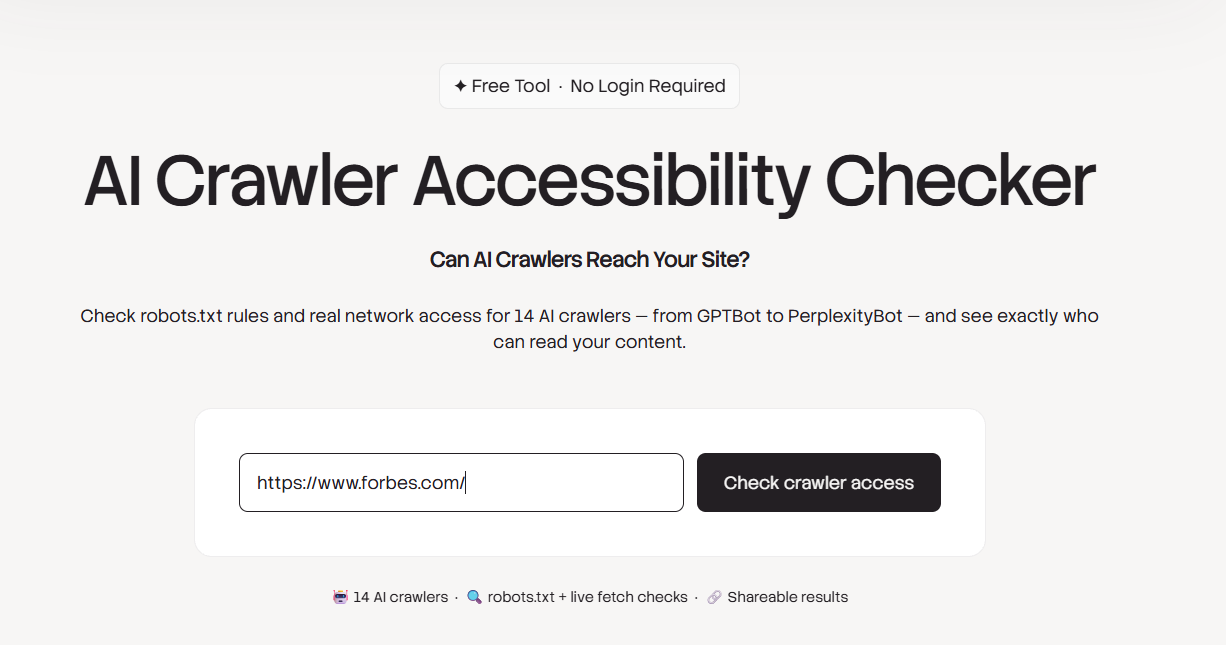
Use a key product or article page rather than the domain root when you can, because a site often allows crawlers on the homepage while disallowing the directory holding the content you actually want quoted. We used the Forbes homepage here so the result is easy to reproduce.
Step 2: Read the summary line
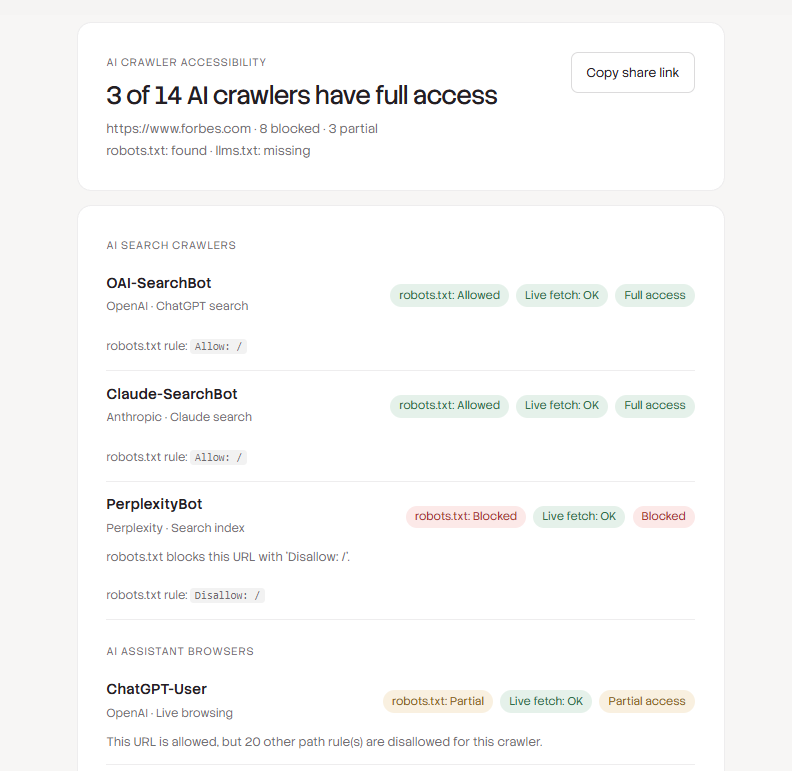
Three of fourteen crawlers had full access. Eight were blocked and three had partial access. The line underneath confirms robots.txt was found and llms.txt was missing, which is normal and costs nothing.
Step 3: Check the search crawlers first
These decide whether you can appear in an AI answer at all, so they come first in the report. In the same screenshot above:
- OAI-SearchBot: allowed, live fetch OK, full access
- Claude-SearchBot: allowed, live fetch OK, full access
- PerplexityBot: blocked by Disallow: /
Forbes is a candidate for ChatGPT and Claude search answers, and is not in the Perplexity index at all. One line in a text file separating two very different outcomes.
Step 4: Check the browsing agents
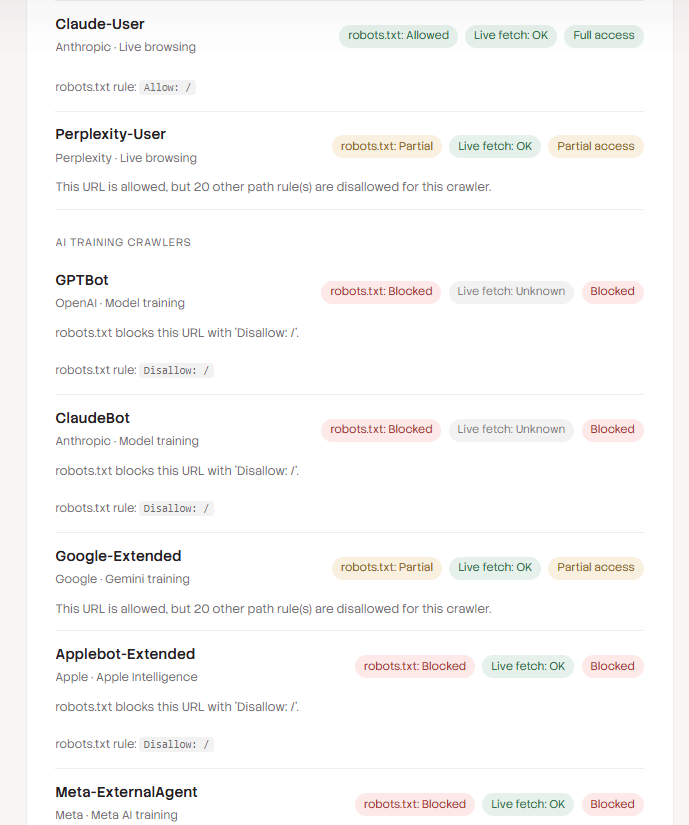
Claude-User had full access. ChatGPT-User and Perplexity-User came back as partial, with the same note: the URL scanned is allowed, but twenty other path rules are disallowed for that crawler. Those paths are worth reviewing, because a partial result on your homepage says nothing about your documentation or product directories.
Step 5: Check the training crawlers
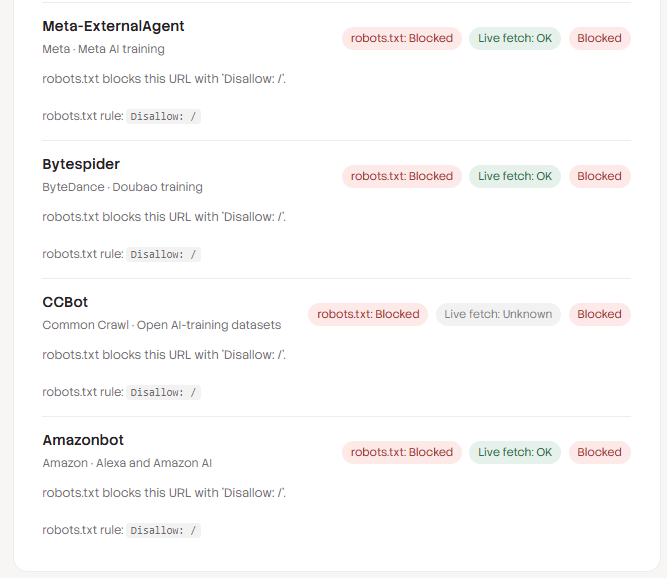
GPTBot, ClaudeBot, Applebot-Extended, Meta-ExternalAgent, Bytespider, CCBot, and Amazonbot were all blocked, with Google-Extended at partial. This is what a deliberate decision looks like: a publisher with licensing leverage keeping its content out of model training while staying available to the crawlers that generate citations.
How to read your results
Every row carries two findings, the robots.txt verdict and the live fetch verdict, and the combination is what matters.
- Full access. Both checks passed. Nothing to do.
- Blocked. The specific rule that decided it appears in the row, as with Disallow: / above.
- Partial access. Either the checks disagreed, or this URL is allowed while other paths are not. You get the count of those paths, not a list.
- Not checkable. Shown as unknown on the live fetch, meaning a timeout or a rate limit rather than a block.
- Could not reach this site. Your server refused an ordinary browser too, so the refusal is not about AI crawlers specifically.
Those last two exist because we decided against returning fourteen clean greens and reds. A timeout is not a block, so we retry once and then report the row as not checkable rather than sending you hunting for a rule that does not exist. Every scan also sends a control request as an ordinary browser, so a site that refuses everyone gets named as such instead of showing fourteen false blocks. Better to say we could not get an answer than to say a crawler is blocked when it is not.
The row worth pausing on
PerplexityBot returned robots.txt blocked and live fetch OK, and the verdict was blocked. Two checks disagreeing is exactly the case a syntax only validator cannot report. The network layer let the request through while the file said no, and a compliant crawler follows the file, so the verdict follows the file too.
The reverse pattern is the expensive one: robots.txt says allowed and the live fetch fails. That means something in your CDN or firewall is overriding your intent, and no amount of editing robots.txt will fix it.
Every result comes with a copy share link, because the person reading the scan is rarely the person who can edit robots.txt. Forward it to whoever owns your CDN settings or your deploy pipeline.
Check each subdomain separately
Robots.txt is per host, not per site. Your blog on blog.example.com, your docs on docs.example.com, and a help center on a vendor domain each serve their own file and can each carry different rules. A clean scan on your main domain says nothing about any of them. Run one scan per host you publish content on, starting with whichever holds the pages you most want quoted.
How to fix each block
Most blocks are one line in a text file. A few are a toggle in a dashboard.
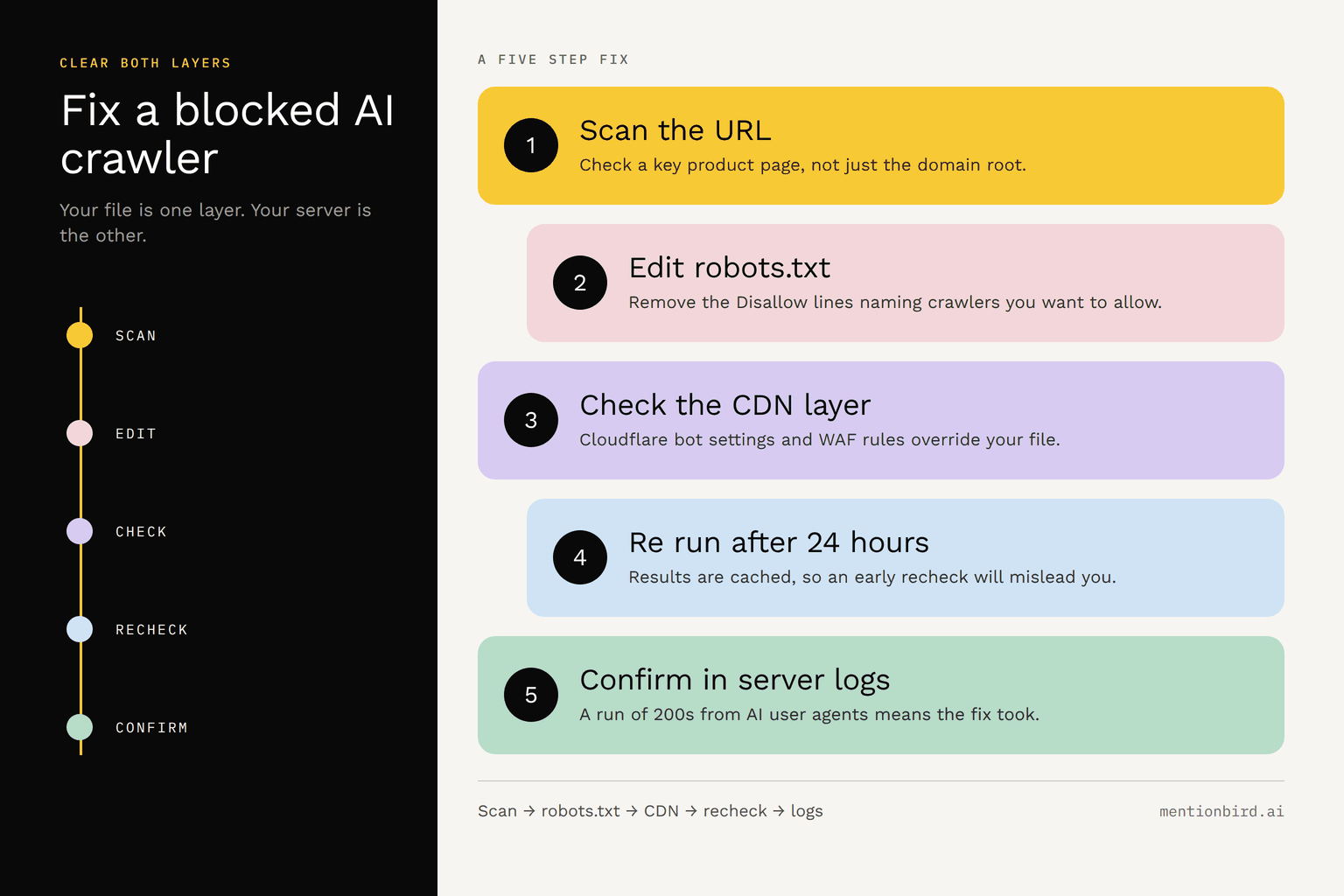
In robots.txt: Remove the Disallow rules naming the AI agents you want to allow, then add an explicit block rather than relying on defaults. A named user agent rule beats a wildcard rule, so this survives a restrictive User-agent: * section elsewhere in the file:
User-agent: OAI-SearchBot
User-agent: Claude-SearchBot
User-agent: PerplexityBot
User-agent: ChatGPT-User
User-agent: Claude-User
User-agent: Perplexity-User
Allow: /
In Cloudflare: Open Security, then Bots, and check three places:
- The legacy Block AI bots setting, which has three states: off, block on all pages, and block only on pages with ads. Newly created domains were set to block on all pages.
- The newer Search, Agent, and Training controls, remembering that blocking Training also blocks multi purpose crawlers like Googlebot.
- Your WAF custom rules, since a rule matching on user agent strings overrides anything you set above.
In other common defaults: WordPress security plugins, several managed hosts, and a few site builders ship with a block AI crawlers toggle switched on. If your robots.txt looks clean and the live fetch still fails, one of these is usually the cause.
Then verify: Re run the scan on the same URL, but note that results are cached for up to 24 hours per URL and crawler, so a fresh unblock may still show the previous verdict. Your server logs confirm it faster, since successful fetches from AI user agents will start appearing there.
How long before an unblock shows up
Longer than the fix takes. Live browsing agents see the change on their next request, so that path is close to immediate. Search crawlers have to recrawl and reindex before you become a candidate again, which takes days to weeks depending on how often they visit you. Training access is slower still, since it only matters when the next model gets built.
Should you allow all AI crawlers?
No, and anyone telling you otherwise is skipping a real argument. Blocking training crawlers is a defensible business decision that publishers with licensing leverage have made deliberately. Your content becomes part of a model you do not control, you receive nothing measurable in return, and the crawl volume itself is not free. The Anthropic crawler ClaudeBot has been measured making roughly 71,000 requests for every referral click it sends back.
What is worth separating is the timeline. If you change one thing, change the search and browsing crawlers, then take as long as you need on the training question.
Set your expectations for what that buys you, though. Access makes you eligible, not permanent. ChatGPT and Gemini replace 64% of their top five recommended brands from one answer to the next, so a single citation is a moment rather than a position.
What this check cannot tell you
Access is table stakes, and being reachable is not the same as being cited. A scan tells you whether a crawler can fetch your page. It says nothing about whether your page answers the question well enough to be quoted, or whether AI engines mention you at all when buyers ask about your category.
Crawler access is the one thing in AI visibility you can settle in a minute and fix in a line. Run the check, clear the blocks you did not choose, then spend your effort on the part that is actually hard.
Note: Once crawlers can reach your pages, the next question is whether the engines actually name you. ChatGPT brand tracking and Perplexity brand tracking show whether that access is turning into mentions and citations.
Frequently asked questions
- How often should I run this check?
Once now, then after any infrastructure change: a CDN migration, a new WAF rule, a security plugin update, or a domain moving to a new host. Those are the moments when blocks appear without anyone editing robots.txt. A quarterly check catches the rest.
- Does blocking AI crawlers hurt my Google Search rankings?
Not through robots.txt. Googlebot handles Search, and Google-Extended only controls whether Google can use your content for Gemini training, so disallowing it changes nothing about how you rank. The risk lives at the network layer instead, where a rule that blocks a category of AI traffic can catch Googlebot along with it.
- Do I need an llms.txt file as well?
No major AI engine has confirmed it uses one, so treat it as optional. It costs almost nothing to publish, and the scan reports whether you have one, but a missing llms.txt has never been the reason a page failed to get cited.
- Can I allow AI crawlers on some pages and not others?
Yes. Robots.txt rules work at path level, so you can allow a crawler on your documentation directory while disallowing it on customer portals or internal tools. Name the crawler, then list Allow and Disallow paths under it, ordering the more specific rule first.
- What about AI crawlers not on this list?
New agents appear regularly, and smaller ones often share behavior with the fourteen here. The general defense is the same: a wildcard rule sets your baseline, named rules handle the exceptions, and your server logs will show you any new user agent worth adding a rule for.
- Will allowing AI crawlers increase my hosting costs?
Search and browsing crawlers fetch modestly, so the impact is usually negligible. Training crawlers are a different matter, since they fetch in bulk and repeatedly. If bandwidth is a real constraint, that is another argument for treating the two decisions separately.
- How do I confirm from my server logs which AI crawlers reached my site?
Filter your access logs by user agent string using the tokens in the table above, then look at the status codes. A run of 200s means the crawler got through. A run of 403s means something rejected it before your page ever loaded.
Other free MentionBird tools to use:
- AI Content Score: scores a page on how quotable it is once crawlers can reach it, which is the question this checker cannot answer.
- Keyword to Prompt Generator: turns the keywords you already track into the prompts buyers actually type into ChatGPT and Perplexity.
Also read:
Other resources you can refer to:

Find out if AI can reach you, then if AI recommends you
First month $19 with code TRY19, then $79/mo. Cancel anytime.